
CBZ, EPUB and PDF reader guide for iPhone and iPad
Use MangaFuru (Manga Furu) to read comic archives, ebooks and PDF documents you already have. This guide explains which reader opens each format, how to import files, and how to find your books and resume reading.
Updated · MangaFuru Team
Before you import
You need an iPhone or iPad running iOS or iPadOS 18.6 or later, MangaFuru, and a CBZ, EPUB or PDF you can access in the Files app. Local files do not require a Komga server, repository or separate MangaFuru account.
If Files shows a cloud icon beside the book, download it first and check that the download finishes. Import a complete file rather than a web link to a book. Keep the original file separately so you can import it again if needed.
Choose the reader for your file
CBZ, EPUB and PDF share the same import path but use different reading engines. The format determines the page layout and available controls; changing a filename extension does not convert the content.
CBZ comic reader: image pages
A CBZ contains comic pages packaged in a ZIP archive. Use it for comics or manga made of page images. MangaFuru opens the archive in the manga reader, where you can choose a reading direction and layout that suits the book.
After importing, open the book in Local Source and start reading from its detail page. If pages are missing or out of order, check the images and their ordering in the original archive. A ZIP of unrelated documents is not necessarily a readable comic.
EPUB ebook reader: books and novels
Use EPUB for your ebooks and text novels. MangaFuru opens it in the ebook reader instead of treating the book as a folder of comic images. Many text EPUBs adapt their layout to the screen; the publication's own layout still matters.
Choose the complete .epub file in Files, wait for import, then open its detail page in Local Source. If the book cannot open, check the original publication and whether it has access restrictions. MangaFuru does not convert a PDF into EPUB or remove DRM.
PDF reader: documents with fixed pages
Use PDF for books, manuals and comics whose original page layout should stay intact. MangaFuru opens them in the PDF reader. A scanned PDF may contain only page images, while another PDF may include text; importing does not turn scanned pages into an EPUB book.
Select the .pdf file through the same import flow, then open the imported document from its detail page. If pages do not render, confirm the original PDF opens and is complete. This is a reading workflow, not a PDF editor or file-conversion service.
Import files and start reading
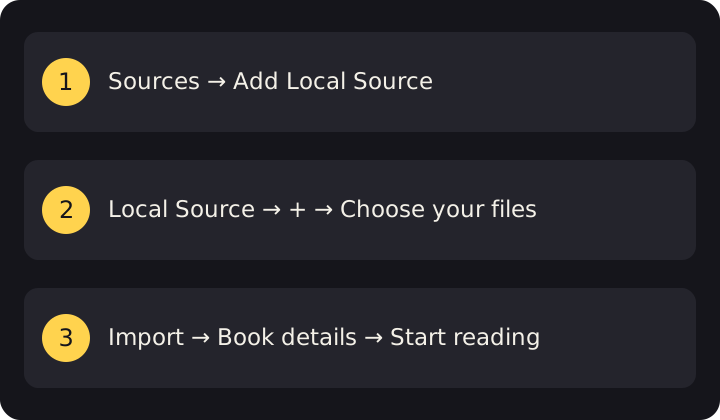
- Add Local Source. Open Browse and tap the top-right + to open Sources. Find Local Source in the available section and add it. If it is already added, continue to the next step.
- Open the local catalog. Return to Browse and open Local Source.
- Choose your book. Tap the top-right +. In the system Files picker, choose your CBZ, EPUB or PDF and wait for import to finish.
- Start from the detail page. Open the imported book and tap the reading action. Each format opens in its corresponding reader.
- Add it to Library if you want it there. Importing makes the book available in Local Source; it does not automatically add it to your Library collection. Add it from its detail page for easier access later.
For example, a comic.cbz, novel.epub and manual.pdf all follow these steps, but each opens in a different reader. Your reading position is retained so you can continue later.
When a file will not import or open
- The file is greyed out in Files
- Check that it is a supported format and is available from the file provider. Finish cloud downloads, then select the actual file rather than a folder or shortcut.
- Import finishes, but I cannot find the book
- Look in Browse → Local Source first. The Library tab only contains titles you added to your collection.
- A CBZ has no pages
- Check that the archive contains readable comic images and is complete. Renaming a PDF or another archive to .cbz will not convert it.
- An EPUB or PDF will not open
- Check that the original file opens, is not truncated, and is accessible without unsupported protection. Use a complete copy you have permission to read.
If the problem continues, report the format, device, app version and exact step that failed. Do not attach private books or credentials to a public issue.
Offline reading, progress and backups
After successful import, local reading does not need a manga server to supply pages. Before traveling, open the book once to confirm it is available. An EPUB or PDF downloaded by Files still needs to finish importing into MangaFuru.
MangaFuru retains reading progress, but offline access is not a backup. Keep your original files and review backup coverage before moving devices. Background chapter downloads and automatic iCloud backups are Premium conveniences; they are separate from local import.
Download MangaFuru on the App Store
Already have a server? Connect your Komga library. Otherwise, local files are the direct starting point.